Full-stack Vibe No-coding Platform
AI builds it end to end, from first edit to launch. Take over anytime for pixel-level visual control.


Master Momen with step-by-step guidance
Master Momen with step-by-step guidance

Engage and receive hands-on support
Engage and receive hands-on support

Watch and learn how apps are built in Momen
Watch and learn how apps are built in Momen

The latest news, cases, and resources
The latest news, cases, and resources

AI builds the whole stack
Describe what you want, and the pages, the database and the backend services all get built in one pass

AI builds your pages
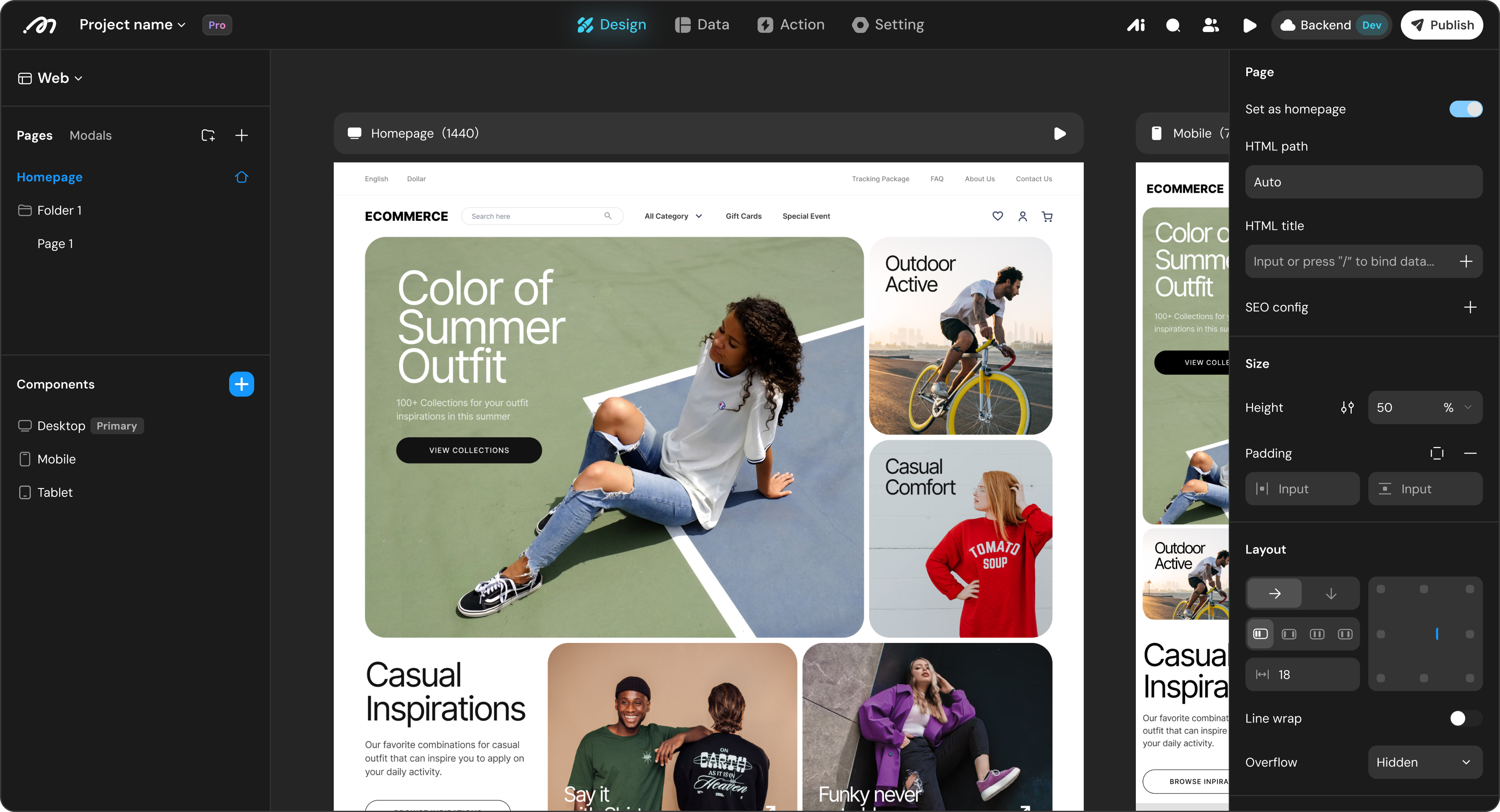
Describe the interface and AI produces real, editable pages right on the canvas — layout, components, styling and multi-device breakpoints in one pass.


AI builds your database
Explain the business and AI derives the tables, field types and relations, then generates the matching backend APIs.

AI builds your backend services
The logic on top of your data is AI's job too: connect external APIs, configure agents, orchestrate server-side flows.
Take over anytime for precision work
What AI hands you is not black-box code but a visual project you can open at every layer and refine down to the detail

Frontend

Define your design system
Color variables and palettes, light and dark modes, font families, sizes and weights, plus radius, spacing and shadow tokens, all in one place. Change the theme once and the whole app follows; every variable shows you where it is referenced.

Configure components
↗
Text, inputs, lists, conditional containers and other primitives, each with its own properties, styling, data bindings and interactions. Save any combination as a custom component and reuse it across pages.

Build pages and layouts
↗
A free-form canvas built on the box model and Flexbox, with relative, absolute and fixed positioning plus responsive breakpoints, so one page fits desktop, tablet and mobile.

Backend

Data model and data management
↗
Create tables visually, set field types and relations, add unique constraints and row-level permissions. Handles hundreds of millions of records, with full CRUD, cross-table views, Excel and CSV import-export, and dependency analysis in the Bird's-eye View.

Actionflow orchestration and debugging
↗
Drag nodes to compose server-side logic: database operations, conditional branches, loops, transactions and timeout policies. Trigger from component actions, schedules or database changes, and test-run with real inputs to inspect every node's result.

AI agent configuration and debugging
↗
Customize the model, prompt, input and output schema, knowledge retrieval and tool set. Common LLMs are built in and you can bring your own model service, then run a test conversation right in the editor.

Third-party API configuration and debugging
↗
Import from OpenAPI or cURL, with five HTTP methods, three body formats and response schemas defined per status code. Collections hold shared base URLs and tokens, and you can fire real requests from the editor.

Ship it, then keep it healthy
One click from preview to production, and full visibility into dependencies, resources and failures once you are live

Multi-client publishing
Deploy one backend to Web and native apps, and run several independent clients in a single project sharing the same database, permissions and business logic — multi-tenant SaaS or role-specific frontends without rebuilding the backend. Preview a real client environment in Mirror before release, with pre-release and production kept apart.

Role-based permissions
Roles decide which data each user can read and write, and which APIs, Actionflows, AI agents and payment capabilities they can call. Combined with attribute-level rules, unauthorized access is blocked at the backend rather than in the UI.

Bird's-eye View
A graph of how tables, APIs, Actionflows, variables and components depend on each other. Before you drop a field, retire a table or change an API, follow the edges to find every page and flow that would break.

Runtime logs and troubleshooting
Actionflows, database operations and third-party API calls all leave a trace. Filter by category or field, drill down by traceId, and find exactly which run and which node failed.

Resource management
Usage and breakdowns for AI points, SMS, scheduled Actionflow runs, traffic, database and object storage, and RPS, with top-up packs for any single quota. The Resource Manager also shows which records reference each media file, so you can find orphaned files and reclaim storage.
Built to grow
Get found, look legitimate, keep users and get paid — the growth infrastructure ships with the platform

Get found
SEO and traffic analytics

Look legitimate
Custom domain and branding

Keep users
Sign-in and third-party accounts

Get paid
Built-in payments
SEO and traffic analytics
Global and per-page TDK, sitemaps and search-console verification files, plus CSR, SSG and SSR rendering modes chosen per page so your content actually gets indexed. Inject custom script tags into the header or body to wire up any analytics or marketing stack.
Code where no-code ends
Whatever the canvas cannot build, write it — no-code speed without a no-code ceiling

React code components
↗
Write custom components in React and TypeScript. Once published they behave like native ones on the canvas: drag them in, configure properties, bind data, even subscribe to project tables. Components are versioned and can be rolled back at any time.
Run Code nodes in Actionflows
↗
Drop code into a server-side flow and reach the database, third-party APIs, other Actionflows and media assets through the Context API. Heavy algorithms and data wrangling need no detour, and AI helps you write the node.
Host your own frontend project
↗
You can write the frontend entirely by yourself: connect the Momen backend through the Runtime API, then deploy your React or Vite project to Momen hosting and get a live URL, custom domain and SSL included — no servers to run.
Connect your AI to Momen
Build from inside Claude Code or Cursor — what the AI produces is not dead code, it is a project you can keep editing visually
Plugin
One command installs the dev kit for Claude Code, Codex, Cursor, Kimi and opencode. From there the AI can create projects, adjust the data model, orchestrate Actionflows, configure agents and permissions, and sync it all live.
