Vibe-nocoding makes full stack apps simple for anyone


You can build a full stack web app without writing a single line of code. That's the promise of vibe-nocoding: you describe what you want in plain language, and an AI-powered visual tool turns your idea into a working app. And yes, the result is real. You get a front end, a back end, and a database — not a mockup or a clickable prototype.
This is for beginners, founders, and side-project dreamers who have a clear idea but no coding background. Below, you'll find a simple walkthrough and an honest look at where these tools fit best. Ready? Let's build something.
Key Takeaways
Describe your app idea in plain language. The AI tool builds the database, logic, and screens for you.
Follow five simple steps: design, build the database, set up logic, preview, and publish. You can launch an app in one afternoon.
You can build real full stack apps without writing code. These apps have a front end, back end, and database.
Modern tools support large user bases and let you add code later if needed. Your app can grow with you.
You own your app and data. You can see and edit every part, and you can extend it on your own terms.
What Is Vibe-Nocoding?
Describe It, Don't Code It
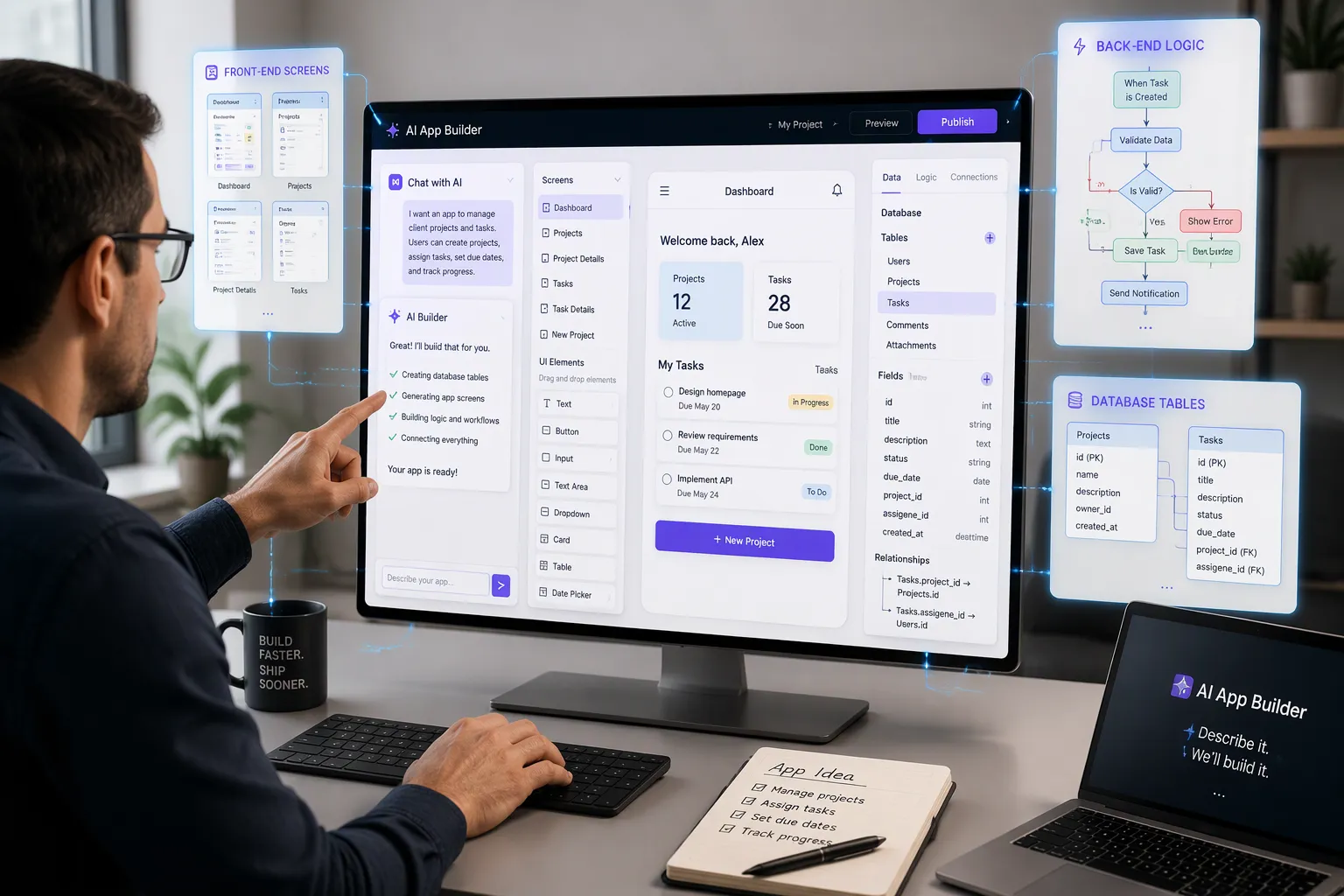
Think about how you order a custom meal at a restaurant. You don't walk into the kitchen and cook. You tell the server what you want — extra sauce, no onions, a side of rice — and the kitchen handles the rest. Vibe-nocoding works the same way. You describe your app idea in plain language, and an AI-powered visual tool builds the database, the logic, and the screens for you.
That's the core idea in one sentence: you talk, the tool builds. You might type something like "a task tracker where users sign up, add tasks, mark them done, and see their progress." The AI reads that description and starts assembling the pieces. It suggests tables, fields, and connections. It drafts screens. It wires up basic flows. You review everything as it appears, and you adjust by describing what you want different.
Here's the part that surprises most beginners: this is not a black box. You can see every table, every screen, and every logic flow the tool creates. You own them. Nothing hides behind a curtain.
The environment itself feels familiar if you've ever used a design tool. It looks and works a lot like Figma for app design. You drag elements, resize layouts, and style interfaces visually. The difference is that your design is live. A button you place actually connects to real data and real logic. And when you want more control, you can drop into code later — React components, JavaScript logic — without rebuilding anything. Start visual, go deeper only if you need to.
Front End, Back End, Database
A full stack app has three layers, and it helps to know what each one does before you build.
The front end is what users see and touch — the screens, buttons, and forms. The back end is the engine room. It runs your rules: who can log in, what happens when someone clicks "complete," which data gets saved. The database is the memory. It stores every user, task, and record in structured tables with fields and connections between them.
Traditional development means writing separate code for all three layers and gluing them together. Vibe-nocoding collapses that work into one visual workspace. You define your data in the database panel. You design screens in the editor. You connect them with visual triggers, flows, and actions instead of written functions. All three layers stay in sync because they live in the same place.
That sync matters more than it sounds. Change a field name in your database, and your screens and logic can follow. Add a new table, and it's immediately available to your interface. You spend your time on the idea, not on plumbing between layers.
Build a Task Tracker in Five Steps
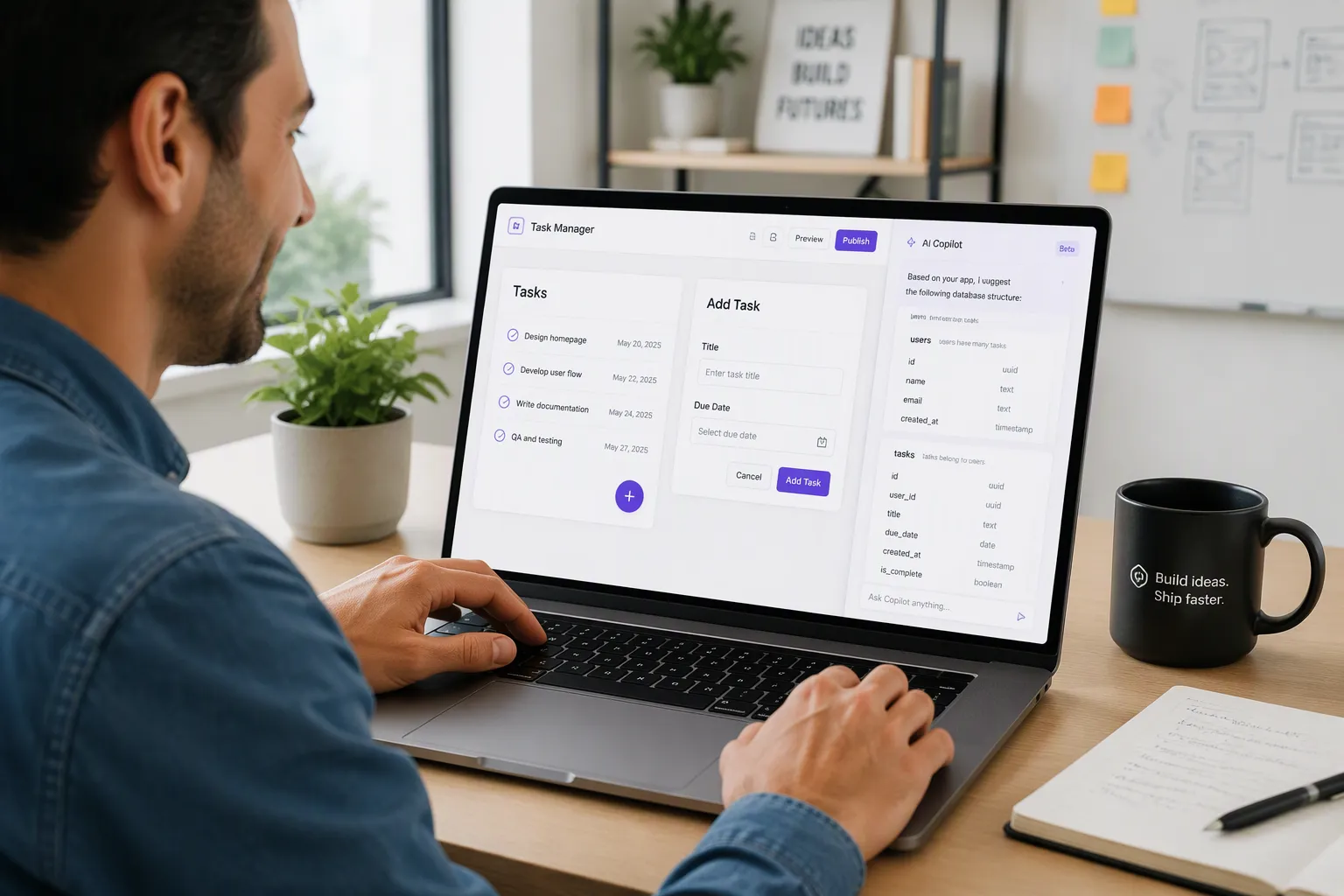
Time to put the idea into practice. You'll build a simple task tracker, and the whole process follows five steps in order: design, build the database, set up logic, preview, and publish. Here's how each one feels in a vibe-nocoding tool.
Design and Build the Database
Step one is design. You open a visual editor and sketch your screens. Picture a login page, a task list, and a form for adding new tasks. You drag elements onto a canvas, resize them, and style them until the layout looks right. Start with the task list screen. Place a header, a list container, and a floating add button. Then build the add-task form with fields for title and due date. The editor feels like a design tool you may already know. The difference is that every button and form you place is live. It can connect to real data the moment you wire it up. No setup files, no terminal, no build step.
Step two is the database. This is where an AI Copilot earns its keep. You describe your data in plain words: "users have many tasks, and each task has a title, a due date, and a done status." The Copilot proposes tables, fields, and the connections between them. It also suggests sensible field types, like text for the title and a date picker for the due date. You review the suggestion, rename a field, add another, and confirm. The database now exists, and your screens can read from it. Want a priority field later? Add it, and the change flows through your app.
Set Up Logic, Preview, Publish
Step three is logic. Your task tracker needs rules. A new user should get an empty list. Marking a task done should update its status. Only the owner should see their own tasks. You build these rules with visual triggers, flows, and actions. A trigger is the event, like a button click. A flow is the sequence that follows. An action is the result, like saving a record. You connect them on screen, and the logic runs without a single written function. Complex rules stay readable because you can see the whole flow at a glance.
Step four is preview. You test the app with simulated real users and data. Fake accounts appear, tasks populate, and you click through every screen as if you were a real visitor. Invite a teammate to click through it too, and watch where they hesitate. Something feels off? Change it on the spot and preview again. This loop stays fast because nothing needs redeploying. You catch problems before anyone else does.
Step five is publish. One click deploys both the front end and the back end, and the whole thing goes live in under 30 seconds. Your task tracker now has a real URL, a real database, and real users can sign up. No server setup, no hosting decisions, no deployment checklist.
That's the full cycle. Five steps, one afternoon, zero lines of code. The platform here is just one example of a vibe-nocoding tool. The pattern holds across the category: describe, review, adjust, ship.
What You Can Build
Great Fits for Vibe-Nocoding
You can build more than you might expect. Here are the shapes that fit best:
Web apps: dashboards, portals, booking tools, and internal tools.
Mobile apps for iOS: the same app, sized for a phone.
Backend-only solutions: an API or data service with no screens at all.
Community platforms: member profiles, posts, and messaging.
Collection apps: catalogs of cards, records, or anything you like to track.
Take the collection app as an example. You define an item table, add fields for name, condition, and photo, then build a grid screen and a detail screen. Users sign up, add items, and browse their collection. That's a real product, and it ships in the same five steps you just read.
Community platforms follow a similar path. You start with users, posts, and comments. Then you add rules for who can post and who can reply. The visual logic handles the flow, and the database keeps everything organized.
Common Limitations to Know
Honesty helps here. Some projects still call for code or a developer, and that's fine. Highly custom interfaces may push past what visual editors offer out of the box. Unusual integrations with outside systems can need extra work. Very complex logic, like multi-step approval chains with many edge cases, may be easier to express in written code.
The good news is that vibe-nocoding tools rarely lock you in. You can start visual and drop into React components or JavaScript when a screen or rule needs more. That mix keeps you moving without hitting a wall. Know your app's shape before you start, and you'll pick the right path.
Scale and Stay in Control
Will It Grow With You?
You might worry that a no-code tool works fine for a weekend project and then falls apart when real users show up. That worry makes sense, but it doesn't have to hold you back. Modern vibe-nocoding platforms support growth up to large user bases and massive data sets. One example platform handles up to 1 million daily active users. So you can launch small and keep growing without rebuilding on a different stack.
Growth also means new needs. Maybe you want to charge for your app. Built-in Stripe integration lets you manage payments and subscriptions when you're ready to monetize. You don't need to stitch together a separate billing system. The same workspace that runs your app can run your business.
Who Owns the App and Data?
You do. That's the short answer, and it matters. You can see and own the database, the logic, and the screens you build. Nothing hides in a black box. Your tables, your flows, and your interfaces all stay visible and editable.
Control goes further when you want it. Fully searchable logs show you what happened and when. You can drop into React components and JavaScript logic for any screen or rule that needs more. A self-documenting GraphQL API gives you a clear, readable way to connect outside systems. Start visual, then reach for code only where it helps.
Ownership and control work together here. You built the app, you can inspect every part of it, and you can extend it on your own terms. That's a solid place to stand as your idea grows.
You don't need a coding background to ship a real full stack app. Vibe-nocoding removes that barrier, and a clear idea is all you need to start. So pick one small app — a task tracker, a simple catalog, anything you'd actually use. Build it, then change it by describing what you want different in plain language. Each round gets easier.
Full stack development is no longer a closed door for developers only. It's open to founders, beginners, and anyone with a good idea and the will to try. Start small today, and let your app grow with you.
FAQ
Do I need any coding experience to start?
No. You describe your app in plain language, and the tool builds the database, logic, and screens for you. You review each piece as it appears and adjust by describing changes. If you ever want more control, you can add React components or JavaScript later.
How long does it take to get an app live?
Most simple apps come together in an afternoon. You move through five steps: design, build the database, set up logic, preview, and publish. Publishing deploys your front end and back end in one click, in under 30 seconds.
Can I charge users for my app?
Yes. Built-in Stripe integration lets you manage payments and subscriptions when you're ready to monetize. You don't need to bolt on a separate billing system. The same workspace that runs your app handles your business side too.
What happens if my app gets popular?
You won't outgrow the tool. Modern platforms support large user bases and massive data sets — one example handles up to 1 million daily active users. You can launch small and keep growing without rebuilding on a different stack.
Can I still get under the hood if I want to?
Absolutely. Fully searchable logs show you what happened and when. You can drop into React components and JavaScript logic for any screen or rule. A self-documenting GraphQL API gives you a clean way to connect outside systems.
See Also
Create Affordable No-Code Full-Stack Web App Development Platform
Discover Real Facts About Building Fullstack Apps Using V0
Top No-Code Web App Builders for Beginners in 2025
