From Contact Email to Application Queue: AI-Assisted Intake for a Startup Incubator

An admission-only incubator is only as good as who gets in, and plenty of the people asking to join sell services to founders instead of building a company. This app gives the incubator's website a real intake: an AI agent labels every application, a team member approves or rejects it in one click, and the applicant gets a discovery-call link or a reason.
The site, the form, the approval dashboard, the agent, the logic and the Gmail integration were all generated by Momen's in-product AI Copilot, with no separate frontend. Everything below was read back out of the generated project.
The Problem a Static Page Can't Solve
An incubator's website usually explains the program well and then stops at a contact email. A brochure page has no database behind it, so every "I'd like to join" ends up as free text in an inbox. Someone has to read it, work out whether the sender is a founder or an agency, and write a reply by hand. That gap is the difference between a website and a web app. Here the homepage keeps its marketing sections and ends in an application form instead of a contact line.

The form asks what the screening needs: who you are, your role, your startup's stage, which markets you're targeting, when you plan to expand and what you want from the network. Next to it are three promises: built for founders, not agencies; the network's target markets only; human review with a reply within one business day. Each one is enforced somewhere in the backend.
One Row Per Applicant, and What the Public Can Touch
Every submission becomes one application row. It accumulates the applicant's own answers first. Then come the AI's verdict and its one-sentence reason, then the human decision and when it was made, the rejection reason if there was one, and the error text if an email didn't go through. A single status column records where the application stands: PENDING_APPROVAL, EMAIL_SENT, EMAIL_FAILED or REJECTED.
The decisions worth copying are in the permissions. An anonymous visitor can insert an application and write the applicant columns. They can't read any application back, and they can't set a status or an AI verdict on their own row. A team member signs in with an account that has been granted the approver role. New sign-ups get nothing until an admin grants it, and the sign-in screen tells them so. Only approvers can read the full table, and only approvers can run the approve and reject flows. No role at all can call the AI agent directly. It runs only inside the backend flow below.
Sorting Builders From Marketers
The lead_qualifier AI agent runs on GPT-6 Luna. It receives the whole application as one block of labelled text and returns one of three verdicts, plus a reason:
QUALIFIED: a founder, co-founder or technical lead building the company themselves, targeting at least one of the network's markets and planning to expand within about twelve months.
MARKETER: an influencer, agency, consultant or service provider whose business is selling to founders. These are rejected.
NOT_A_FIT: everything else. This includes no startup, the wrong markets, a far-off timeline, or too little information to tell.
The instructions lean in two deliberate directions. The agent is told to be strict about the marketer category: building an audience is not building a startup. When it's unsure between qualified and not a fit, it is told to choose not a fit and say what's missing. Both choices protect the network more than they protect the inbox. A borderline founder who gets flagged costs the reviewer one extra read. A marketer who slips in costs every member a pitch.
The verdict comes back as structured output: an enum field and a short reason field, with no prose to parse. The enum lands straight in a typed column, and the reason is written to be something "a human reviewer can act on". This is the same pattern as an AI content classifier, applied to people instead of posts.
The AI Labels, the Human Decides
The screening runs without anyone pressing a button. A database trigger fires on every new application insert and starts qualify_application, an asynchronous Actionflow. The applicant sees "submitted" straight away and never waits on the model.
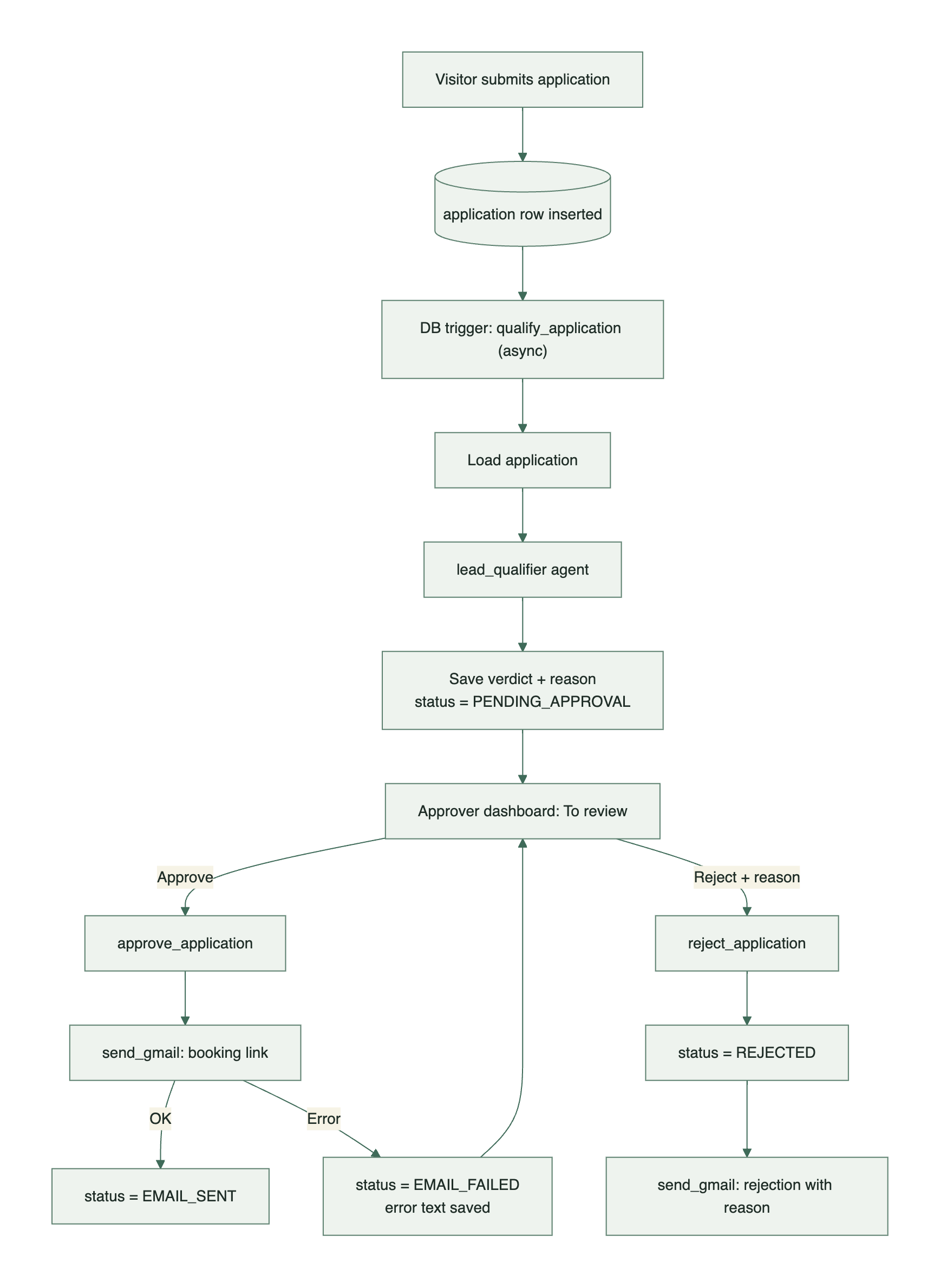
qualify_application does three things. It loads the row, calls the agent with the applicant's answers, and writes back the verdict and reason with status set to PENDING_APPROVAL. That's all it does. The verdict is a label and never a decision, so this flow sends no email and closes no application. Whatever the model concludes, a person sees the application next.
[Image: Approver dashboard showing an application card with the AI verdict, reason, applicant details and the Approve / Reject buttons]
The dashboard has four tabs that map onto the status values: To review, Approved, Rejected and Email failed. Applications are listed oldest first, which suits a team promising a reply within a business day. Each card puts the AI's verdict and reason next to the applicant's own answers, so the reviewer can check the label against the evidence before deciding.
approve_application is synchronous, because the reviewer is waiting on the result. It starts with a filtered update: it stamps the decision time only on a row that isn't already EMAIL_SENT or REJECTED. If that update matches nothing, the application was already handled and the flow does nothing. If it matches, the flow emails the applicant a discovery-call booking link and branches on what Gmail said. If Gmail accepted it, the status becomes EMAIL_SENT. If not, the status becomes EMAIL_FAILED and the error text is saved on the row. A failed send doesn't vanish into a log. It shows up in its own tab with the reason, and because EMAIL_FAILED passes the same filter, the approver can try again from there.
reject_application takes the reviewer's typed reason, and the dashboard asks for confirmation first. The applicant will read that text, and the dialog says so. The flow marks the row REJECTED under the same filter, records the reason and the time, and emails the applicant. The email thanks them by company name, quotes the reason and says they're welcome to apply again if their situation changes. An application that has already been accepted can't be rejected afterwards, and a rejected one can't be quietly approved.
Using a filtered update as a guard is the same move as choosing one state column over a scattered set of flags: the where clause carries the rule.
This is also where the project differs from a travel site that scores a lead and sends the quote automatically. There, the AI's output is the reply. Here, a reply from the wrong person costs more than a slow one, so the AI only gets as far as the reviewer's queue.
Sending From the Team's Own Gmail
The emails don't go through a transactional email service. They're sent from the team's own Google Workspace mailbox through the Gmail API, so a reply comes from the same domain the applicant will keep talking to. Both approve and reject call one shared sub-flow, send_gmail, which takes a recipient, a subject and an HTML body and returns either OK or a readable error.
Two Google endpoints are registered as third-party APIs: the OAuth token endpoint and Gmail's send endpoint. The credentials they need never reach the browser. A Google service account with domain-wide delegation authorises the send. Its JSON key is stored as a Momen secret, and it is read only inside the flow.
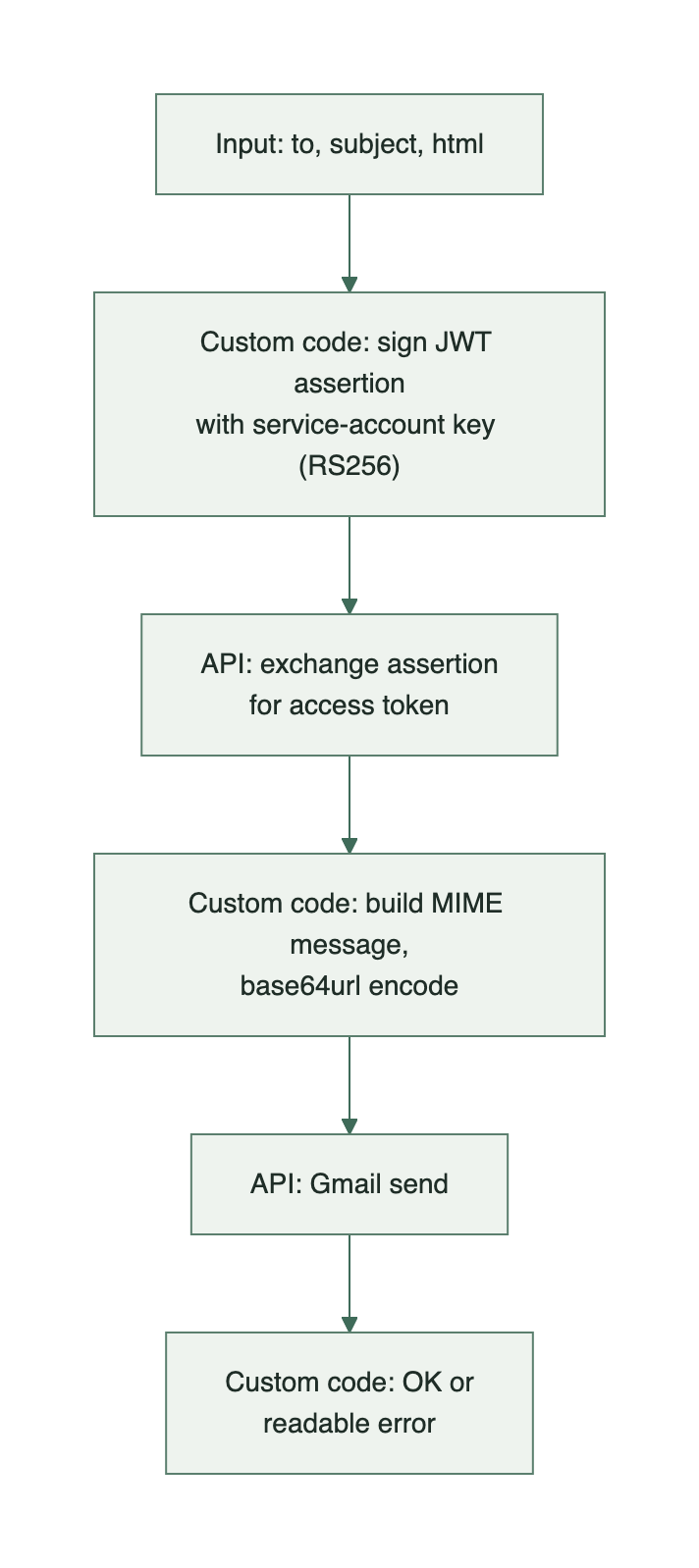
The flow runs three custom code nodes around the two API calls. The first signs a short-lived JWT with the service account's private key, scoped to sending mail only. Google exchanges that assertion for an access token. The second builds the raw MIME message, with the sender's display name, UTF-8 encoded headers and an HTML body, and encodes it the way Gmail expects. After the send, the third checks both responses. If either the token exchange or the send came back empty, it returns which step failed along with what Google said. That return value is what the approve flow branches on and what ends up in the Email failed tab.
What Had to Be Spelled Out
Little of what mattered here was visual. The Copilot could produce the marketing sections, the card layout and the form without much guidance. What it needed from a person were the rules.
The three verdicts, and which way to lean when the evidence is thin. That the AI writes a label and never sends anything. That status values belong to specific flows, and that a row already sent or rejected can't be acted on again. That a failed email is a state to show the reviewer, not an error to swallow. That the reviewer's rejection reason goes to the applicant word for word, so the interface should warn before it does. That only approvers see applications, and new accounts start with no access.
These are policy decisions that only the team running the network can make. Writing them down was the real work. Generating the system from them was the quick part, which is the split of work Momen is built around.
What It Costs to Run
Building it with AI Copilot takes roughly 30 minutes to an hour, most of it spent writing down the rules above.
The minimum plan is Basic at $39/month. It covers unlimited AI agents, Actionflows and third-party API integrations, plus the custom domain a public-facing site needs. Basic also includes one custom permission role, and this project needs exactly one: approver. Anonymous and Logged-in User are built in and don't count toward it. Pro isn't required. The membership purchase button links out to an external checkout, so no payment runs inside this project, and the team has no need for SSO or a second client.
The resources that could grow into add-ons scale with application volume, not with the number of team members. Each submission spends AI Points on one short classification. Because the screening starts from a database trigger, each submission also counts as one automated Actionflow run, and Basic includes 10,000 a month. Each application adds a small text-only row to the database, and nothing is uploaded, so object storage stays empty.
At the scale of about 2,000 total users over a 225-day operating window, the pricing calculator puts the whole project at $39/month, the Basic plan with no add-ons. The screening uses about 163K AI Points against the 1M included, and the database holds about 31 MB against the 200 MB included. Intake would need to grow several times over before any add-on line appeared.
The Gmail API carries no per-message charge. Sending runs on the Google Workspace seat the team's mailbox already has, within Gmail's normal daily sending limits.

