A One-Page AI Art App Where the Style Prompt Never Leaves the Server


Restyle does one thing: somebody uploads a photo, picks one of six art styles by name, and an AI agent redraws it in that style, shown side by side with the original. Everything they make collects further down the same page, visible only to them. New accounts get three generations; after that, five more cost five US dollars through Stripe.
It is all one page — signing in and buying credits swap sections rather than navigating anywhere. And the whole thing, backend and frontend, came out of one prompt pasted into Momen's in-product AI Copilot. Everything below was read out of the resulting project.
Try the live app · Clone it in the Momen editor
What Somebody Actually Sees

A visitor who has never signed in still gets the whole thing — the hero, the six styles, the upload box. They can go all the way to pressing Generate, and that is where they're asked for an account. Sign-up is a username and a password, nothing more.
After that: upload, pick a style, press the button, wait about a minute, and the result appears beside the original, ready to download. Switch styles and go again without re-uploading. Everything they've made stacks up in a gallery further down the same page, and the remaining credit count sits in the header where they'll see it before they spend one.
Two things never make it into the database. The photo somebody uploaded is not stored anywhere — it goes to the model and it's gone. Neither is a failed attempt: the only thing a generation can leave behind is a finished image. Nothing to clean up later, and no quiet archive of other people's faces.
The Prompt Library Never Reaches the Browser
Each style is stored as two separate things: a name somebody picks, and a paragraph of art direction sent to the model word for word. "Neo-Noir Cinematic" is the label; the instruction behind it is three sentences about chiaroscuro and wet asphalt. Adding a seventh style is a row, not a code change.
Which sets up the best decision in the project. On the styles table, permissions grant client roles exactly two readable columns: the id and the name. The instruction column is not selectable by any role at all.
So the six art-direction paragraphs — the actual product, the thing a competitor would copy in ten seconds if they could see it — never travel to a browser. They're read server-side inside the generation flow and handed straight to the model. Open devtools on the live app and you get six names. The prompt library isn't obfuscated or minified; it simply isn't in the response.
Column-level read control is what makes that possible, and it applies just as well to the boring cases: a person's credit balance is visible to them and to nobody else, because the row filter says so rather than because the UI doesn't render it.
The Agent Doesn't Know What Style It's Applying
The redraw runs on an AI agent using Gemini 3.1 Flash Image at 4K. It's told it's a digital artist that receives a photo and an art-style instruction, and given four rules: apply the instruction exactly as written, keep the subject recognizable in the same pose and framing and aspect ratio, return only the image, never reply with text.
The instruction arrives as a variable. The agent has no idea which of the six it just got, and nothing downstream branches on it. Six styles are six rows, not six code paths — so editing "Cyberpunk 2099" to be less teal is a text edit in a table nobody can read before or after.
The Actionflow: Generation
One asynchronous Actionflow carries the whole path: credit check, style lookup, the model call, the debit, and the saved result.
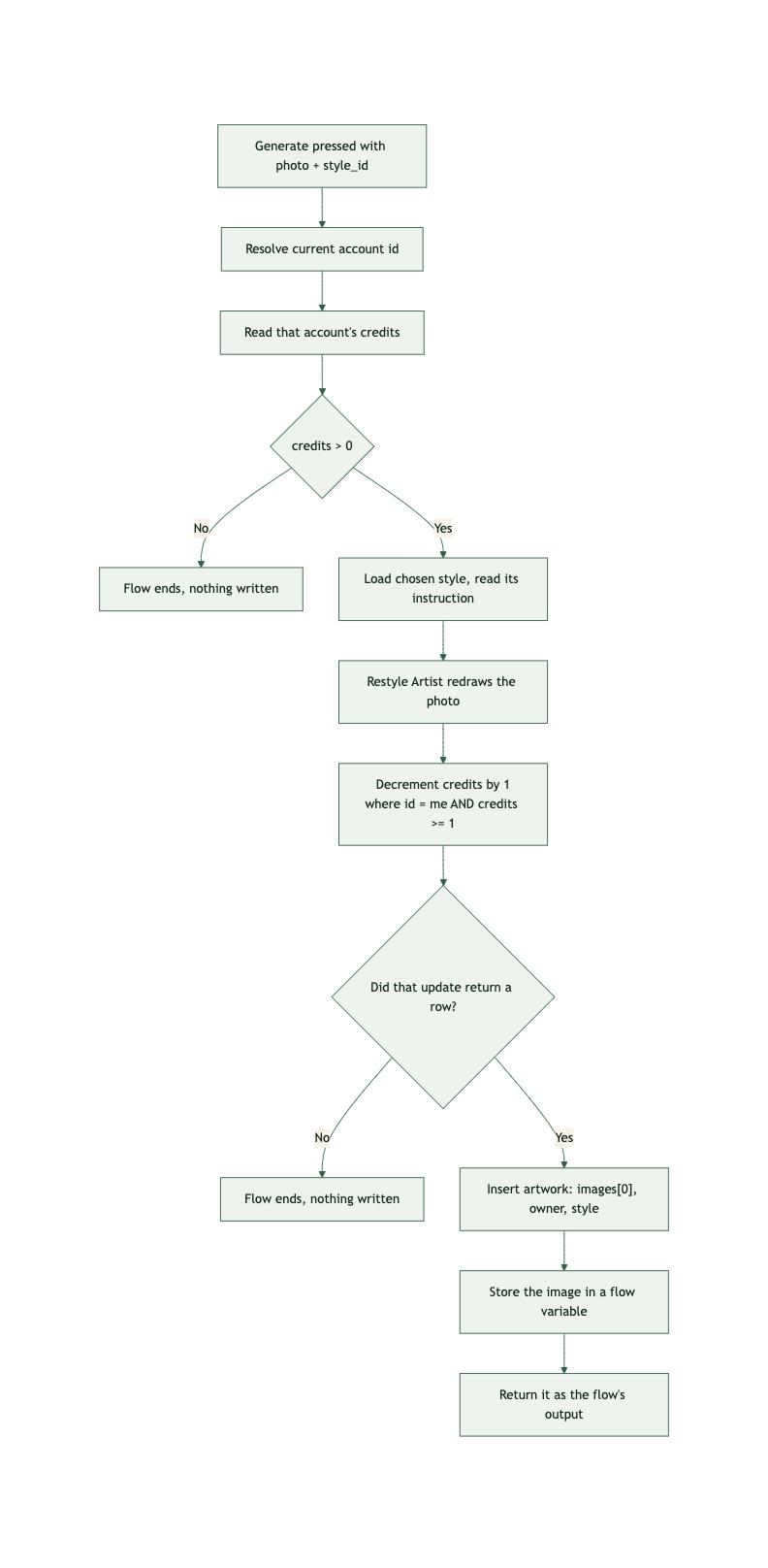
Read the order, because it is the point.
The credit check happens before the model is called — no balance, no inference, so nobody burns AI Points on a request that was never going to be honoured. The debit happens after the agent node, so a run that never produces an image never reaches it. And the debit is not a read-then-write: it is an update that decrements credits by one, filtered on id = my account and credits >= 1, and the next branch continues only if that update actually returned a row. If the balance was spent by another tab in between, the filter matches nothing, the branch falls through, and no artwork is inserted. The database arbitrates, not a number read four nodes earlier — the same reason a claim limit belongs in a filtered update rather than a counter you read and trust.
The finished image is saved against its owner and style, and also handed back as the flow's own output — which is how the page can show the picture immediately without the source photo ever having been stored, and without a failure row to poll.
Buying Credits
Pressing buy creates a pending order against the current account and nothing else. The amount isn't set there — the order is a claim ticket, and the price is settled server-side by the payment module rather than by a number the browser handed over. A five-dollar pack costs five dollars because the backend says so, not because the checkout was asked nicely.
Payment: One Guard, In the Right Place
Payment uses Momen's built-in Stripe integration with credit_order bound as the order table.
Credits are never granted from the browser's success screen. The webhook is the only thing that adds them: it identifies the payment, marks the order paid, and tops the buyer up.
The guard sits at the front. When the webhook records that this payment has been handled, that write is itself conditional — and if it changes nothing, the callback has been seen before and the flow takes a branch that does nothing at all. Stripe will deliver the same event twice; the second one can never reach the step that grants. Paying once and being credited twice is one of the standard ways money leaks out of an app, and it costs one conditional write to prevent.
Worth knowing if you clone this and start editing that flow: the grant itself isn't separately guarded, so that first check is load-bearing. There is no refund path.
What Had to Be Spelled Out
Almost nothing typed into the Copilot was about screens. Four instructions did nearly all the work, and each one shows up in the finished project as a structural decision rather than a feature.
Check the balance before starting any work, and only take one off once an image has actually come back — both, not one or the other. That is why the check and the debit sit on opposite sides of the model call. Asked for as "deduct a credit per generation," it would have produced the obvious, wrong thing: charge first, refund on failure, and lose the refund whenever a run dies mid-flight.
Store the style's name and its instruction separately, and send the instruction to the model word for word. That produced the two-column table, and downstream, the column permission that keeps the instruction off the wire. Six styles became six rows instead of six branches, and the asset stayed on the server.
The only thing ever written down is a finished image. That is why the artwork table has one content column and no status field. A status plus failure_reason pair would have been the reflexive design, and it would have meant keeping a permanent record of every time the model hiccupped on somebody's face.
The price comes from the server, never from the browser, and a payment confirmed twice must never grant twice. Neither is a feature. Both are the difference between a demo and something you can point real money at.
None of that is design, and all of it is what goes wrong when left implicit. The Copilot handled the layout, the palette and the copy on its own — which is the division of labour this way of building assumes. What it needed from a human was the state rules and the rules about money.
The paid version is the harder one. Drop the credit packs and the Stripe wiring and the same app runs on a lower plan, with nothing to reconcile and no webhook to get right.
The Frontend
One page, generated in the same pass — hero, style picker, upload box, result comparison, sign-in and purchase modals, and the personal gallery, with signing in swapping sections rather than navigating anywhere. Because generation runs asynchronously, the result panel holds a status message for the minute the model takes and then renders what the flow returns, instead of freezing on a request that would have timed out.
How Long This Takes
Generating all of this took 30 minutes to an hour, most of it spent writing the prompt rather than waiting on it.
The minimum plan is Pro at $99/month, because selling credit packs through Stripe is a Pro feature. Binding the order table to the payment module is also permanent, so that's a decision to make before launch rather than after.
Everything above the plan is driven by how much people actually generate, not by how many accounts exist. AI Points are spent per image, so an idle account costs nothing — the credit check runs before the model call, so a user at zero never triggers an inference at all. Object storage grows because every 4K result is kept forever, and outbound transfer grows because those images get served back into the gallery every time somebody scrolls it. Nothing accumulates from the uploads, since source photos are never stored.
The pricing calculator sizes this at 3,000 registered users and 1,000 anonymous visitors, projected a year out. At that scale it lands on $235/month: $99 for the plan and $136 of add-ons, of which $110 is AI Points — the generated images themselves — and the remaining $26 is storage and transfer. Database storage stays inside what the plan already includes.
Which is the shape worth noticing. Four-fifths of the add-on cost is the product doing its job, and it only appears when people actually make something. Plug in your own volume to size it against your own numbers.
Stripe charges its usual per-transaction fee, separately from anything you pay Momen.
Explore the Project
Try the live app · Clone it in the Momen editor
Cloning gives you the data model, the column-level permissions, the agent, the flows and the page exactly as described; the Stripe keys are yours to add. Generate an image first, then open the styles table and read the instruction the model was actually sent — the one thing the live app will never show you.
If you'd rather the frontend were a codebase you own than a page in the editor, the Momen plugin hands the same backend to Claude Code, Cursor or Codex.
