How to Build Apps with GPT-5.2 (No-Code Guide Using Momen)

GPT-5.2 just released on December 11, 2025, is OpenAI’s most capable model series so far for professional knowledge work.
Its biggest improvement is not speed, but reasoning quality—how well the model understands instructions, plans steps, and works through complex problems.
In real-world use, GPT-5.2 is:
More deliberate in how it thinks through tasks
More persistent with difficult or ambiguous problems
Better at long-form reasoning and structured output
Because of this, GPT-5.2 is a strong fit for AI agents, backend logic, and workflow-driven applications.
This guide explains how to build apps with GPT-5.2, and how to integrate it into a real product without managing complex infrastructure.
Why GPT-5.2 Is Better for Building Real Apps
When building AI-powered apps, the main challenge isn’t generating text—it’s getting the model to think correctly across multiple steps.
GPT-5.2 performs better than earlier models at:
Following complex, multi-step instructions
Maintaining context across long inputs
Producing structured, predictable outputs
Handling logic-heavy tasks like analysis, planning, and coding
This makes GPT-5.2 especially useful when the AI is part of your app’s core logic, not just a chat interface.
Common Problems When Integrating GPT-5.2 Directly
Many builders trying to integrate GPT-5.2 run into the same issues:
Managing API keys and environments
Tracking token usage and cost
Orchestrating multi-step AI logic
Connecting AI output to databases and frontends
Handling retries and failures
These problems slow down development and make it harder to ship a real app.
How to Build an App with GPT-5.2 Using Momen
Momen is a no-code AI development platform with GPT-5.2 built in, so you can focus on your app logic instead of backend setup.
Step 1: Create a New Project
Create a new project in Momen. Every new project receives 100,000 AI Points.
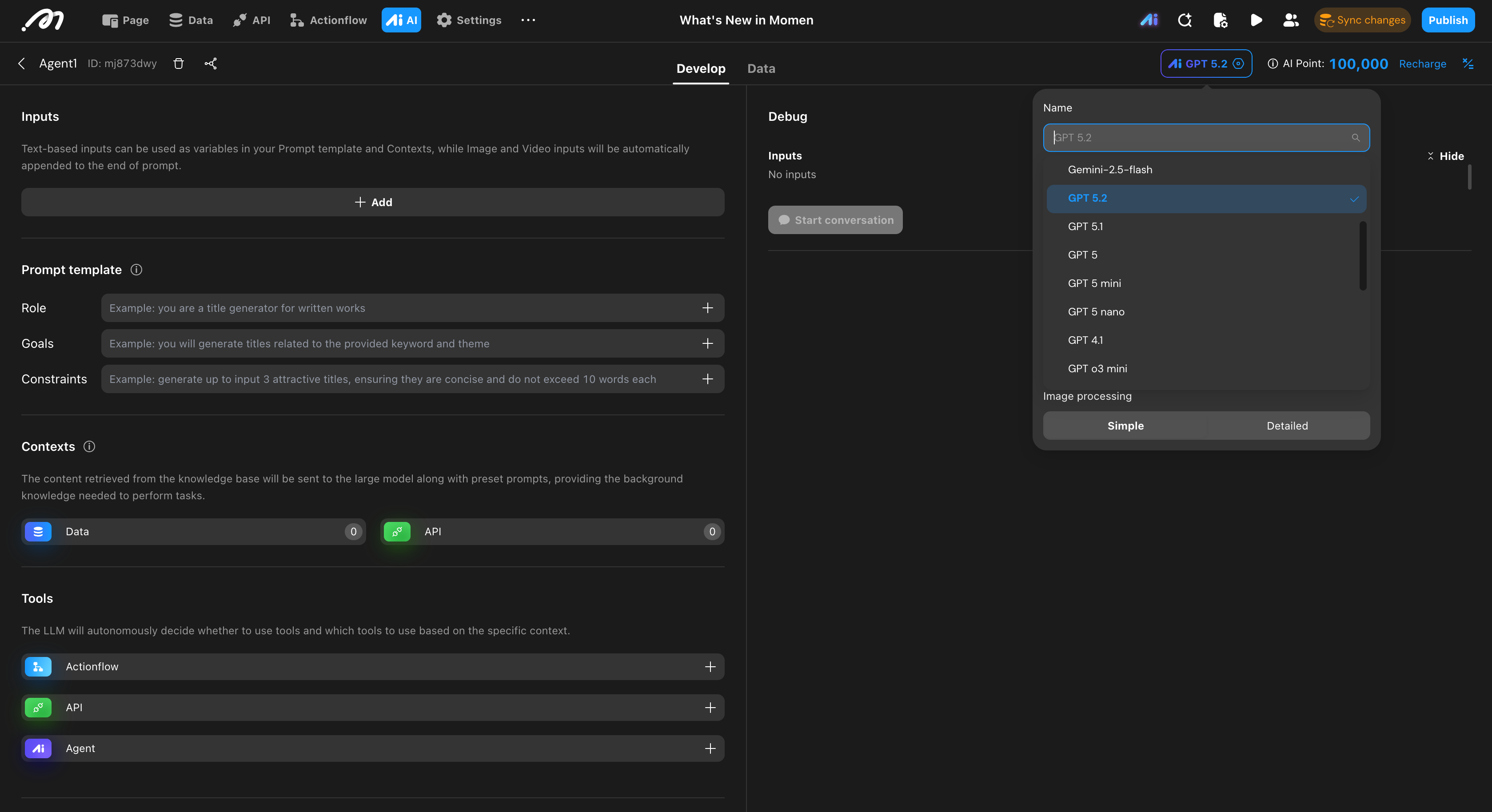
Step 2: Select GPT-5.2 in Momen AI
Open the Momen AI section
Choose GPT-5.2 from the model selector (top right)
No API key or external setup is required
GPT-5.2 usage automatically consumes AI Points.
Step 3: Design Your AI Agent Workflow
Instead of a single prompt, you can design AI workflows, such as:
Multi-step reasoning
Conditional logic
Tool usage
Database read and write actions
This is where GPT-5.2’s reasoning ability becomes useful in real applications.
Step 4: Connect GPT-5.2 to Your App
With Momen, GPT-5.2 can:
Process user input
Access your database
Call external APIs
Return structured results to your frontend
All of this is done visually, without writing backend code.
Step 5: Sync and Publish
Once your workflow is ready:
Click Sync backend changes
Publish your app
Your GPT-5.2-powered app is now live.
How Much Does It Cost to Build with GPT-5.2?
Each new project includes 100,000 AI Points, roughly equivalent to:
~67,000 GPT-5.2 input tokens
~8,500+ GPT-5.2 output tokens
Actual usage depends on:
Prompt length
Reasoning depth
Workflow complexity
You can always check the AI Points calculator in the Momen dashboard for exact numbers.
Using GPT-5.2 with Your Own Models (BYOM)
If you already deploy AI models on your own cloud, Momen supports Bring Your Own Model (BYOM).
With BYOM, you can:
Connect your own model endpoints
Use your own API keys
Control cost and performance
You can also integrate external providers such as OpenRouter, including models like Claude, DeepSeek, and Kimi, and use them alongside GPT-5.2 in the same app.
What Types of Apps Can You Build with GPT-5.2?
GPT-5.2 is commonly used to build:
AI agents that perform multi-step tasks
Research and analysis tools
Internal tools and dashboards
Automation and workflow systems
Logic-heavy backend services
If your app depends on reasoning instead of speed, GPT-5.2 is a good choice.
Is GPT-5.2 Right for Your App?
GPT-5.2 works best if you:
Need strong instruction-following
Rely on multi-step logic
Care more about correctness than instant responses
Are building a serious AI-powered application
For simple chat or fast responses, lighter models may be enough. For real application logic, GPT-5.2 offers clear advantages.
Start Building with GPT-5.2
If you’re looking for:
How to integrate GPT-5.2 into an app
How to build apps with GPT-5.2 without heavy backend work
A practical way to use GPT-5.2 beyond demos
Momen provides a straightforward path to get started.

