BayHaul Junk Removal: Multimodal AI Quotes and Live Routing, No Backend Code

Junk removal is hard to quote remotely — the price depends on what the items actually are and how far the crew has to drive. BayHaul solves both: customers describe their junk and upload a photo, and a multimodal AI agent analyzes both together to return a price estimate with a detected-items breakdown. When they schedule a pickup, the backend calculates real driving distance from the company warehouse before the request ever reaches staff.

The Momen backend handles the AI quoting, the routing calculation, and a two-role permission system — all without server code. The frontend is a React + Vite app built with Claude Code using the Momen no-code plugin.
Try the live app · Open in Momen editor / Clone project
What the App Does
A customer signs up with a username and password, then creates a removal request: a text description of what they need hauled, plus one photo. Submitting the request kicks off an async AI quoting flow in the background. When the estimate is ready, the request shows an estimated price in USD and a structured breakdown of the detected items — what the AI identified from the photo and description, with approximate quantity and volume.
If the customer is happy with the quote, they proceed to booking: they pick a weekday date, one of nine fixed 1-hour time slots (10 AM through 7 PM Pacific), and their pickup address. The frontend geocodes the address to coordinates client-side using Nominatim, then passes those coordinates to the backend. The backend uses OSRM to calculate the real driving route from its fixed warehouse coordinates to that pickup point. The driving distance in miles and duration in minutes are written permanently to the request, and its status changes to scheduled.
On the staff side, a second login route leads to the BayHaul dashboard. Staff see all requests across all customers, filterable by status. Each request shows the customer's description, photo, AI quote, requested time slot, and — critically — the driving distance and time calculated at booking. From the detail view, staff can accept or decline the request, optionally adding a note. A decline note is visible to the customer. A declined request can be edited (different date, time slot, or address) and resubmitted, which runs the distance calculation again for the new address.
How the Backend Is Built
Everything server-side — data model, AI agent, routing logic, permissions — lives in Momen. No server code, no deployment configuration. The backend was configured using Momen's in-product AI Copilot, described entirely in natural language:
If you use the Momen plugin to build it, tell the project URL first.
Use Momen nocode plugin to build this project: {PROJECT_URL}.
If you use Momen in-product AI Copilot, just use this one.
Build only the backend for an AI-powered junk removal service. No front-end — just the data model, roles/permissions, and the automated logic behind it, callable via API.

COMPANY INFO (fixed constants — hardcode these wherever needed, do NOT create a table for them):
- Company name: BayHaul Junk Removal
- Warehouse / dispatch address: 1400 Fairway Drive, San Leandro, CA 94577
- Warehouse coordinates: latitude 37.7057984, longitude -122.1627950
- Business hours: Monday to Friday, 10:00 AM to 7:00 PM, Pacific Time
- The nine valid time slots are the text values "10-11", "11-12", "12-1", "1-2", "2-3", "3-4", "4-5", "5-6", "6-7"

DATA MODEL:
Create exactly one new table, removal_request, related many-to-one to the built-in account table (field name: customer). Its fields:
- description (text)
- photo (a single image)
- price_usd (number — a single estimated price, not a range)
- detected_items (text — the AI writes its item breakdown here as readable text)
- pickup_address (text)
- pickup_latitude, pickup_longitude (numbers — do NOT use a geo-point type)
- pickup_date (date)
- time_slot (text)
- status (text)
- driving_distance_miles, driving_duration_minutes (numbers)
- staff_note (text)

STATUS:
status is a text field holding one of exactly these four values: quoted, scheduled, accepted, declined. Nothing else ever writes to it. The complete state machine is:
- Create Request: creates a new record with status "quoted".
- Estimate Price: requires status "quoted", leaves status as "quoted".
- Book Pickup: requires status "quoted" or "declined", sets status to "scheduled".
- Decide: requires status "scheduled", sets status to "accepted" or "declined".

ROLES AND PERMISSIONS:
Two roles, built with the platform's role/permission system — do NOT add a role field to the account table.
- Logged-in customer: can read only the removal_request rows where customer is their own account. Cannot read anyone else's. Cannot write removal_request directly — all writes go through the actions below.
- BayHaul Staff: can read every removal_request from every customer, including contact info, address and photo.
Also close the platform's default open access: anonymous users get no access to any table at all, and a logged-in customer can only read and update their own account row. No role may call the AI agent or the OSRM API directly — those are only reachable through the actions below.
Create one staff account with email/password login: {staff_email} / {staff_password}, and grant it the BayHaul Staff role directly as data. Do not build an action flow for granting roles.

ACTIONS:

1. Create Request
Input: description, photo.
Insert a removal_request owned by the currently logged-in account, with status "quoted". Leave all other fields empty.

2. Estimate Price (AI)
Input: request_id.
Send the request's description AND its photo together to an AI agent. The agent returns one estimated price in USD, and a text breakdown of the items it detected (item types, approximate quantity, rough volume). Write those into price_usd and detected_items. Status stays "quoted".
The photo must actually be passed to the model as an image — the price must reflect what is visible in the photo, not just the text.

3. Book Pickup
Input: request_id, pickup_date, time_slot, pickup_address, pickup_latitude, pickup_longitude.
Only runs when the request's status is "quoted" or "declined".
Call OSRM to get the real driving route from the fixed warehouse coordinates above to the given pickup coordinates:
  GET http://router.project-osrm.org/route/v1/driving/-122.1627950,37.7057984;{pickup_longitude},{pickup_latitude}
Read routes[0].distance (meters) and routes[0].duration (seconds), convert to miles and minutes, and save them into driving_distance_miles and driving_duration_minutes. Also save pickup_date, time_slot, pickup_address, pickup_latitude, pickup_longitude. Set status to "scheduled".
This is the only place driving distance and duration are ever calculated.

4. Decide (staff)
Input: request_id, decision ("accept" or "decline"), optional staff_note.
Only runs when the request's status is "scheduled". Save staff_note if provided, and set status to "accepted" or "declined" accordingly. Never recalculate distance or duration here — they were already saved during booking.
Data Model
Two tables, each with a clear role:
account— Momen's built-in authentication table, extended withphone_numberandemail. Handles signup and login.removal_request— The core record. Storesdescription,photo(a singleIMAGE),price_usd,detected_items,pickup_address,pickup_latitude,pickup_longitude,pickup_date,time_slot,status,driving_distance_miles,driving_duration_minutes, andstaff_note. Linked toaccountviacustomer_id.
Everything else the app needs is a constant, not a row. The company name, warehouse address, business hours and the nine time slots never change, so they are hardcoded in the prompt rather than modeled as tables — and the pickup coordinates are two plain number columns instead of a geo-point type, which keeps them readable by a Run Code node without a formula in between.
The status machine captures the full request lifecycle:
quoted  →  scheduled  →  accepted
                      →  declined  →  scheduled (resubmit)
Two roles are configured with Momen's RBAC system — Logged-in User for customers, BayHaul Staff for employees. There is no role field on the account table; permission boundaries are enforced at the platform level. Customers can only read their own removal_request records and have no direct write access to that table — all mutations go through Actionflows. Staff see every request with no row-level restriction. Anonymous visitors get no table access at all, and no role can invoke the AI agent or the OSRM API directly — both are reachable only from inside an Actionflow.
The AI Quote Agent
One AI Agent, BayHaul Price Estimator, handles the quoting step. It runs on gemini-3.6-flash at temperature 0 with image input quality set to HIGH, and takes two inputs: description (text) and photo (a single image passed straight through from the request record).
The agent's system prompt instructs it to treat the photo as the primary evidence — customer descriptions are usually short and vague, so what is visible in the image has to drive the answer. It returns two structured outputs: price_usd and detected_items. The detected items field is a readable breakdown — item types, approximate quantities, rough volume estimates in cubic yards — derived from what the model can identify in the photo and description combined.
That the photo genuinely drives the result is easy to verify: submitting the description "Cleaning out the garage this weekend and it's all sitting in the driveway now" — which names no items at all — returns a breakdown listing rolled carpets, wooden furniture, cardboard boxes and scrap wood. That list can only have come from the image.
The Actionflows
Four Actionflows orchestrate the full lifecycle of a removal request.
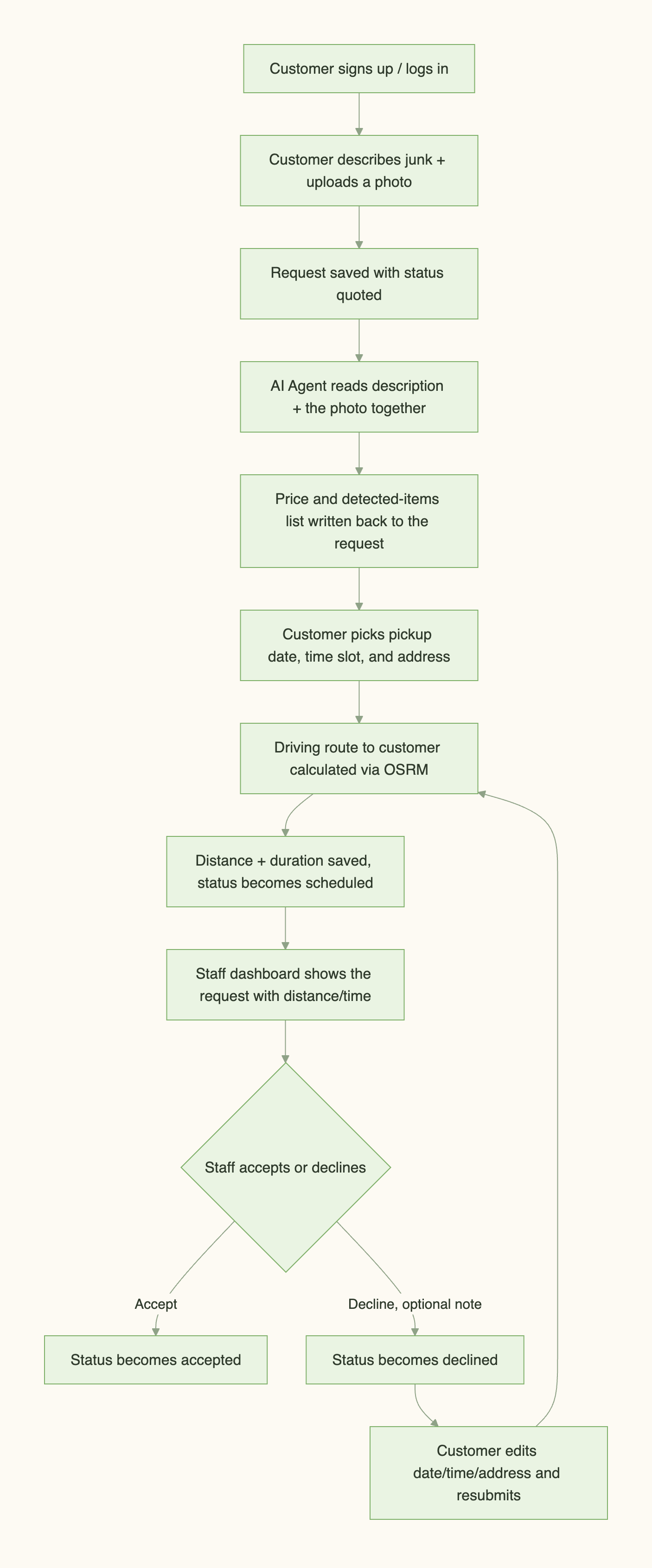
Create BayHaul Request (sync) — Takes a text description and an uploaded photo. A preset Current User node resolves the authenticated account ID, then the flow inserts a new removal_request record owned by that account with status = quoted, and returns the new record's ID. The photo is uploaded to object storage by the frontend first; the flow receives its ID and writes it onto the request.
Estimate BayHaul Price (async) — Takes request_id. Queries the request, passes its description and photo to the BayHaul Price Estimator agent, and writes the returned price_usd and detected_items back to the record. Status stays quoted. This flow is asynchronous because AI agent nodes require it — the caller gets a task handle and the result lands on the row a few seconds later.
Book BayHaul Pickup (sync) — Takes request_id, pickup_date, time_slot, pickup_address, pickup_latitude and pickup_longitude (the customer's coordinates, resolved client-side). Runs when the request is in quoted or declined status, which is what makes it double as the resubmit path — there is no separate rebooking flow. A Run Code node calls OSRM from the warehouse's hardcoded coordinates to the supplied pickup point and converts the response to miles and minutes. The flow writes the pickup details and calculated distance/duration to the request and sets status to scheduled.
Decide BayHaul Request (sync) — Takes request_id, a decision of accept or decline, and an optional staff_note. Requires scheduled status. A conditional binding on decision sets status to either accepted or declined, and the note is written if provided — it is the only staff-authored field the customer can see. Distance and duration are never recalculated here; they were written at booking and do not change.
Accept and decline are one flow rather than two because the logic is identical apart from the value written to status. Booking and rebooking are one flow for the same reason.
External APIs: Nominatim and OSRM
Both APIs are free public services with no API keys required, but they run in different places — only one of them is a Momen Third-Party API.
Nominatim (OpenStreetMap) runs in the browser. The Book Pickup action takes coordinates rather than an address string, so the frontend geocodes whatever address the customer types before submitting the booking. The endpoint asks for a descriptive User-Agent header on every request; browsers refuse to let fetch set that header, so the browser's own user agent is sent instead, which Nominatim accepts.
OSRM (Open Source Routing Machine) runs on the backend, configured as a Third-Party API and called from the Run Code node inside Book BayHaul Pickup with context.callThirdPartyApi(). The public demo server at router.project-osrm.org takes a pair of {longitude},{latitude} coordinate strings and returns a route object with distance (meters) and duration (seconds). The Run Code node converts those to miles and minutes and writes them to the request record.
The warehouse never needs geocoding at runtime. Its address is fixed, so its coordinates (37.7057984, -122.1627950) are hardcoded as the start of every route — one fewer external call, and one fewer thing that can fail mid-booking.
Distance is calculated at booking time and written once. Decide never touches it. If a customer resubmits with a different address, the calculation runs again for the new coordinates.
Building the Frontend with Claude Code
With the Momen backend in place, the Momen no-code plugin passed the project's full context — data model, GraphQL API schema, Actionflow IDs, role configuration — to Claude Code. The frontend was built from natural language:
Use Momen nocode plugin to build the frontend of this project: {PROJECT_URL} with React and Vite, calling into the backend already built in this project.

When the customer submits a pickup address, geocode it in the browser with OpenStreetMap Nominatim (https://nominatim.openstreetmap.org/search, send a descriptive User-Agent header) and pass the resulting latitude and longitude to the Book Pickup action along with the address.

Use light green with soft pastel tones as the primary color palette. Keep the interface simple and clean, avoiding a typical SaaS-style look. Add junk removal-related visual elements throughout so the interface feels engaging and relevant to the subject.

Don't make the homepage just a login screen. Give it a clear value proposition with supporting copy explaining what the app does, along with junk removal-related visual elements, so it feels warm and inviting rather than a bare sign-in form.
Two Ways to Build Something Like This
This project used Momen's in-product AI Copilot to configure the backend, then the plugin to pass that context to Claude Code for the frontend. Two paths are available:
Momen AI Copilot — describe your app in natural language directly inside the Momen editor. The in-product Copilot configures your data model, Actionflows, and UI without switching tools. See Meet Your Nocode AI Copilot — Build Apps by Chatting in Momen for how this works.
Momen plugin + Claude Code — build or describe the Momen backend, then install the Momen no-code plugin in your AI coding agent. The plugin passes your project's full context so you can describe the frontend in natural language and have it wired to the correct endpoints automatically. See the complete setup guide for Momen + Claude Code to get started.
How Long Does This Take
Setting up this Momen backend from scratch — five tables, one AI agent, seven Actionflows, two third-party API configurations, and role-based permissions — takes about 30 minutes to an hour with AI Copilot handling configuration from natural language prompts. Building the frontend with Claude Code, once the project context is loaded, takes around 30–45 minutes for a working version covering both the customer flow and the staff dashboard.
The minimum plan for this project is Basic at $39/month — it covers unlimited AI agents, Actionflows, and third-party API integrations, plus a custom domain.
Add-ons layer on top based on actual usage. For this app, the three that grow with volume are AI Points (the multimodal quoting agent spends points on every photo-based estimate), object storage (customer photos accumulate over time), and outbound data transfer (photos served to the staff dashboard). The calculator sizes its estimate around 4,500 cumulative customers and 225 operating days of data — at that scale, AI Points alone account for $70/month (42M points across ongoing usage scenarios), and storage and transfer add another ~$14. The total comes to approximately $123/month. At a smaller early-stage footprint, the add-on costs would be significantly lower. You can plug in your own usage assumptions and see the line-by-line breakdown in Momen's pricing calculator.
Both Nominatim and OSRM are free public services with no usage fees. Frontend hosting on Vercel is free for most early-stage projects.
Try It and Clone the Project
Submit a request with a description and photo to see the AI quote flow, then book a pickup with a real Bay Area address to see the distance calculation run.
