Bay Canopy: A Tree Removal Estimate App Built with Momen and Cursor

A homeowner with two oaks leaning toward a fence shouldn't have to wait three days for a quote. Bay Canopy is a tree removal estimate tool for the SF Bay Area that cuts that wait to minutes — submit a photo and a short description, and an AI-reviewed estimate lands in your inbox.
The stack is a clean example of the BaaS + Cursor pattern: Momen handles the entire backend — data model, image storage, AI logic, and API — while Cursor built the React + Vite frontend that was then deployed to Vercel. The backend was configured entirely through the Momen no-code plugin, with no server infrastructure to provision or API routes to write manually.
What the App Does

The app is a single-page intake form. A visitor lands on a split-layout page: a full-bleed forest photo on the left, the form on the right.
They fill in:
Name and email (required)
Phone (optional)
A description of the tree(s) — height, condition, any stump grinding preference
Site photos (optional, multiple images accepted)
Hitting Get my free estimate uploads any photos, creates an intake record in the Momen database, and triggers an AI action flow that generates a personalized estimate. The success view confirms: "Check your inbox shortly." A quote follows by email.
That's the entire user flow. No login, no multi-step wizard, no booking calendar — just a fast, frictionless intake.
The Split: Momen Backend, Cursor Frontend
This build separates backend and frontend completely.
Momen owns everything server-side. The database, the file storage, the AI estimate logic, and the GraphQL API are all configured inside Momen using the Momen no-code plugin — no server infrastructure to provision, no API routes to write manually.
Cursor owns the UI. The React + Vite frontend was generated and refined with Cursor, then deployed to Vercel. It connects to Momen's API to submit intake data and upload files.
This separation keeps both sides cleanly scoped. The Momen project can be opened, inspected, and cloned independently of the frontend. The frontend is a standalone Vite app that can be customized or redeployed without touching the backend.
Open in Momen editor / Clone project
Building the Backend in Momen
Data Model
The backend starts with two tables. The intake table stores the customer-facing submission: name, email, phone, and the tree description. The intake_photo table holds references to uploaded images and links them back to their parent intake record.
This one-to-many structure is straightforward to configure visually in Momen. Each field gets a type (text, email, etc.) and the relationship between intake and intake_photo is set as a relational link — no SQL required. For a walkthrough of how data modeling works in Momen, see How to Create Data Models for Your App in Momen.
Image Storage
Momen handles file uploads through a presigned URL flow. The frontend requests a presigned S3 URL from Momen, uploads the image file directly from the browser, and then stores the returned image ID in the intake_photo table. This keeps large files out of the API payload while letting Momen manage the storage reference and permissions.
AI Estimate Logic
After an intake record is created, an Actionflow triggers the estimate generation. Momen's Actionflows are server-side workflows that chain steps — in this case, reading the intake data, calling an AI Agent configured with a pricing prompt, and passing the result to the next step in the flow.
The AI Agent receives the tree description and any photo context, generates a structured estimate for SF Bay Area rates, and hands the output downstream. The entire flow is configured visually inside Momen — no backend deployment required.
External API: Resend
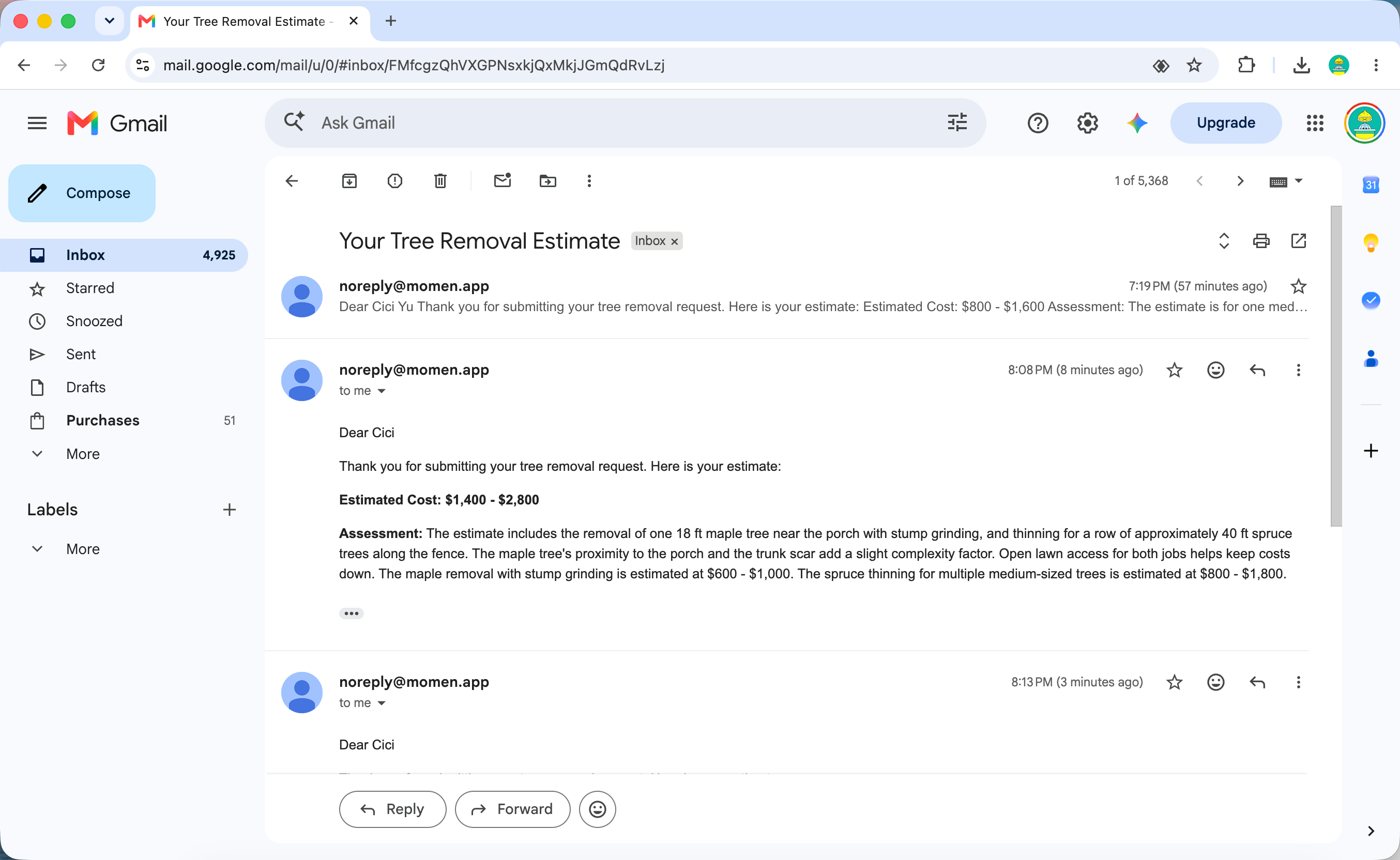
Momen's API feature sits parallel to Actionflows as a backend capability. In this project it handles email delivery: the Actionflow calls the Resend API to send the finished estimate to the customer. The Resend API key and request payload are configured directly inside Momen — no separate email server, no custom middleware. When the AI step completes, Momen makes the API call and the quote lands in the customer's inbox.
GraphQL API
Momen exposes the database and Actionflows through a GraphQL API automatically. The frontend uses three mutations:
imagePresignedUrl— get upload credentials for each photoinsert_intake_one— create the intake record with customer detailsfz_create_action_flow_task— trigger the AI estimate Actionflow
This API is what makes the Momen-Cursor split possible: the frontend doesn't need to know anything about the backend implementation, only the mutation signatures.
Building the Frontend with Cursor
With the Momen API in place, Cursor generated the React + Vite frontend. The design is editorial: a serif display font (Fraunces), copper accent color, a two-column layout with a hero photo filling the left column and the form on the right.
Cursor handled the component structure — the form, the file upload with per-photo preview and remove controls, the loading state during submission, and the success view. The Momen GraphQL endpoint and mutations were passed as context, and Cursor wired the API calls into the submission handler.
The key interactions:
Photo upload: Files are selected, previewed client-side, then uploaded sequentially to the Momen presigned URLs before the intake record is created
Form submission: After photos upload, the intake record is inserted with all customer fields
AI trigger: The Actionflow task is created server-side immediately after the intake record, kicking off estimate generation
Success state: The form swaps to a confirmation panel that names the next steps and confirms the email address where the estimate will arrive
Deployment
The React + Vite app was deployed to Vercel with a standard push-to-deploy flow. The Momen backend requires no separate deployment — it's always running as the hosted service once configured.
This is the key operational difference from a fully in-Momen build (where Momen handles deployment to AWS): with the BaaS + Cursor approach, the frontend lives on Vercel and the builder manages that deployment, while Momen remains the backend host.
Explore the Project
The Momen backend is open to view and clone. Open the editor link to see the data model, the AI Actionflow configuration, and the API setup in full — everything visible, nothing buried in code.
Open in Momen editor / Clone project
If you want to understand the broader pattern — using Momen as a backend while building a coded frontend — How to Build an MVP Without Engineers walks through why this split works well for production use cases that need real backend logic without the overhead of writing servers.

